Home › Blog › How to Make a Valentines Day Video for Him
How to Make a Valentines Day Video for Him
Last updated: October 7, 2026
A step-by-step guide to picking photos, music, and settings to make a heartfelt Valentine's Day video for him using Photo Video Maker.
Quick answer
To make a valentines day video for him, pick 10-15 photos of you two, add a song that fits your story, apply a warm filter, and export in the right shape for however you plan to send it.
Key takeaways
- Choose 10-15 photos that tell your story in order, not every photo on your phone
- Match the music mood to your relationship — upbeat or slow and steady
- Pick vertical for phone sharing, widescreen if he'll watch on a TV or laptop
- Keep text short and personal instead of generic captions
- Preview before exporting so nothing cuts off mid-song
The quickest way to figure out how to make a valentines day video for him is to pick ten to fifteen photos of the two of you, add a song that matches your relationship, and let the app time everything to the beat. You don't need any editing experience — just your phone's photo gallery and a few minutes.
What photos should you choose for his valentines day video?
Pick photos that tell a story in order, not every photo on your camera roll. A first date, a trip, a silly in-between moment, a recent close-up — that mix says more than fifty near-identical selfies ever could.
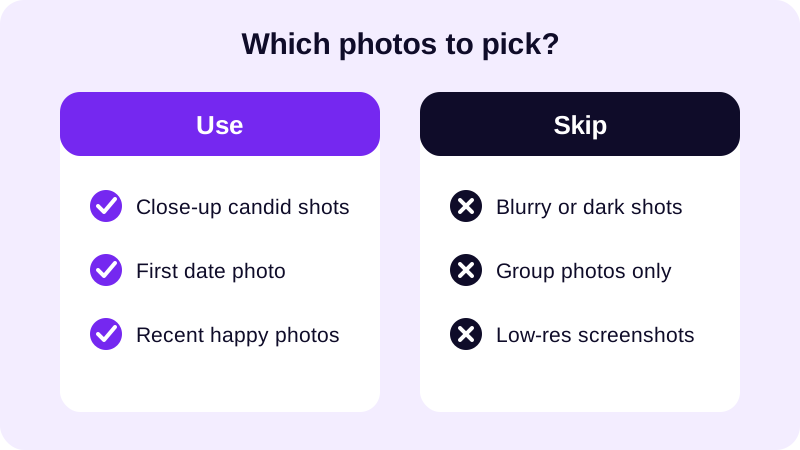
If you don't have many photos together yet, lean on moments that still capture him — a trip he loved, a hobby he's into, the two of you with friends. The goal isn't a perfect gallery, it's a video that feels like your relationship, not a stock photo reel.
It also helps to think about order before you even open the app. Starting with how you met, moving through a few favorite moments, and ending on something recent gives the video a natural arc — almost like a tiny movie instead of a random pile of pictures. If you're struggling to narrow it down, go through your gallery once just picking "yes" or "no" on each photo without second-guessing, then trim that shortlist down to your final ten or fifteen. Resist the urge to add "just one more" — a video that's slightly too long is the single most common reason a sweet gesture turns into something he scrolls through instead of watching.
How do you actually put the video together?
Once you've picked your photos, the building part is mostly tapping through a few screens in order. Photo Video Maker walks you through it the same way whether this is your first video or your fifth.
- Select your photos from the gallery and drag and drop to put them in order.
- Pick an aspect ratio that matches where you'll send it — vertical for a phone, widescreen for a laptop or TV.
- Apply one of the 17+ filters to set the mood, warm and soft usually works for a love video.
- Add a frame overlay if you want a themed border — there are 249 to choose from, so something hearts-and-roses is usually in there.
- Drop in a transition between photos — there are 8 transition effects, pick one and use it consistently rather than a different one every slide.
- Add a short text caption on one or two key photos, then pick music from the built-in library or your own track.
- Use the real-time preview to watch it back, then export.
The real-time preview matters more than it sounds like it should. You can try a filter, see it on your actual photos instantly, and back out if it doesn't fit — no waiting for an export just to find out the warm tone washes out his face in a photo you loved.
Don't feel like you have to use every tool the app offers just because it's there. A video built from a good photo order, one consistent filter, one transition style, and a song that means something will always beat one stacked with every frame, sticker, and effect at once. Simple and personal reads as more thoughtful than busy and polished — especially for something this personal.
What music and style actually fits him?
Match the music to how your relationship actually feels, not to whatever love song is popular right now. An upbeat track suits a newer, playful couple; a slower one suits something steady and long-term.
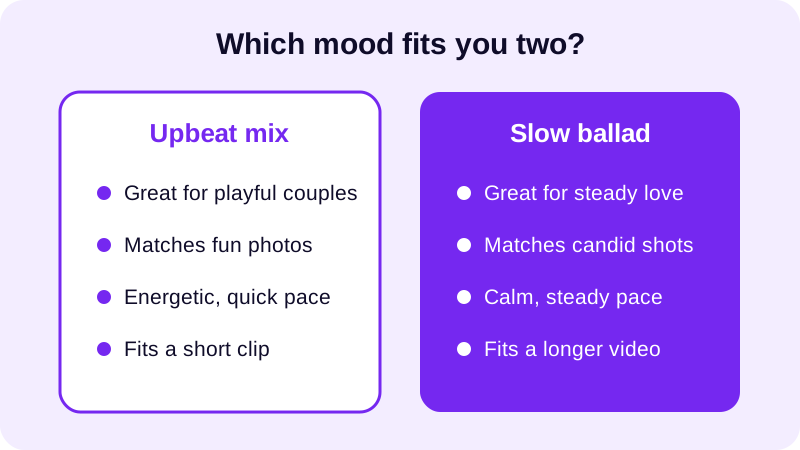
If you already have a song that means something to the two of you, use it — import it straight from your phone instead of browsing the music library. Save it for the moment it actually fits, like a slower swell right as the video reaches your favorite photo, instead of letting it play flat under the whole thing.
Check out where to find royalty free music for videos if you don't have a specific song in mind and want something that sounds good without any licensing worries.
It also helps to think about where the song's chorus lands. If there's a line in the lyrics that means something between you two, try to time it so it hits right as your favorite photo appears on screen. You don't need to be precise down to the second — just close enough that it feels intentional rather than coincidental. A little trimming at the start or end of the track usually gets you there.
How do you share it so it looks right on his phone?
Where you'll send it decides the shape you should export in. A video he'll open in a messaging app like WhatsApp should be vertical and compact; one you're uploading to Instagram or TikTok should match that platform's full-screen vertical feed; one headed to YouTube can go either way depending on whether it's a regular upload or a Short.
Export as MP4 so it opens cleanly no matter which app he taps it open in. Pick 1080p if he's watching on a decent phone or screen, or 480p if file size matters more — say, you're sending it over a slower connection and don't want him waiting for it to load.
If you're not sure which ratio fits which platform, this guide on the best aspect ratio for Instagram Reels breaks it down, and the same logic applies if you're deciding between TikTok, YouTube, or a plain video file for WhatsApp.
Think about the moment he'll actually open it, too. A video that lands as a notification right at midnight on Valentine's Day feels different from one you hand over in person on your phone, and both are different from one posted publicly where friends can see it. There's no wrong choice — just pick the delivery that matches how private or public you want the gesture to feel, and export with that in mind.
Once you've built one valentines day video for him, the next one is faster — you'll already know which filter, frame, and music combination felt right, and Photo Video Maker remembers your settings for next time. For a broader walkthrough of turning any set of photos into a video with music, see how to make a video from photos with music.
Frequently asked questions
How many photos should I use for his Valentine's Day video?
Ten to fifteen photos usually works best. That's enough to tell a real story — your first date, a trip, a silly moment — without the video dragging. More than twenty and he'll likely start skipping ahead instead of watching it through.
What song should I pick for a valentines day video for him?
Pick something that matches how your relationship actually feels, not just a popular love song. A slow, steady track suits a long relationship or anniversary; something upbeat suits a newer, playful couple. Trim it so it doesn't cut off abruptly right at the end.
Should the video be vertical or widescreen?
Vertical works best if you're sending it through a messaging app or sharing on a phone screen. Widescreen suits a video he'll watch on a laptop or TV. Pick based on how he'll actually view it, not what looks fancier.
Can I add text or captions to the photos?
Yes — a short caption on a key photo, like the date you met or a private joke, adds a lot more than a generic 'Happy Valentine's Day' overlay. Keep it brief so it doesn't cover the photo or linger too long.
What file format should I export the finished video in?
MP4 is the safest choice since it plays on essentially any phone or app he'll open it in, whether that's a messaging app or a video platform. Export at a resolution that matches how he'll watch it.